Serialization and Deserialization in JS
What Is Serialization, and Why Is It Needed?
To understand the need for serialization, let us first examine a common problem developers encounter in JavaScript related to data copying.
In JavaScript, when a variable holding a primitive value is assigned to another variable, a deep copy of the value is created. Before proceeding further, it is important to clarify what a deep copy means and why this behavior occurs.
JavaScript data types can be broadly classified into two categories: primitive and non-primitive.
Primitive data types are stored directly in stack memory. Stack memory is fixed in size and cannot grow dynamically at runtime, which makes it suitable for storing simple, immutable values such as numbers, strings, booleans, null, undefined, symbol, and bigint.
Non-primitive data types, such as objects and arrays, are stored in heap memory, which can grow dynamically during runtime. In this case, the actual data resides in the heap, while the variable stored in the stack contains only a reference (memory address) pointing to that data in the heap.
Because primitive types are stored entirely in stack memory, assigning one primitive variable to another results in the value itself being copied. Consequently, any changes made to the copied variable do not affect the original variable. This behavior differs from non-primitive types, where assignments copy references rather than values, leading to shared access to the same underlying data.
This fundamental difference in memory behavior forms the basis for understanding serialization and its role in safely transferring or storing complex data structures.
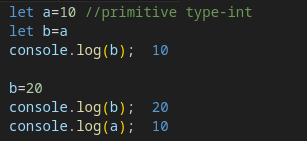
But in non-primitive types like arrays and objects, things work differently. When you assign an object (or array) to another variable, a new copy is not created. Instead, only the reference (address) to the object in heap memory is copied.
Because of this, both variables point to the same object in memory. So if you make any changes using the copied variable, those changes also reflect in the original object. This happens because both variables are referring to the same data, not separate copies.
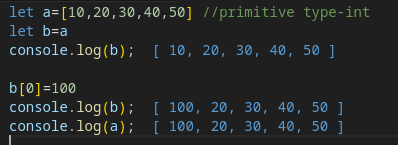
But why does this happen?
For non-primitive types, the actual value is not stored directly in the stack. Instead, the address of the data stored in heap memory is kept in the stack. When you assign this variable to another variable, only the address is copied. Now both variables point to the same memory location. Hence, if you make a change using one variable, it reflects in the other as well.
This creates a problem when we want to create an independent copy of an object.
Solution 1:
Using the spread operator (...). This creates a shallow copy, meaning it copies only the first-level properties. If the object contains nested objects, those nested objects are still shared by reference.
So the question is: how do we create a deep copy?
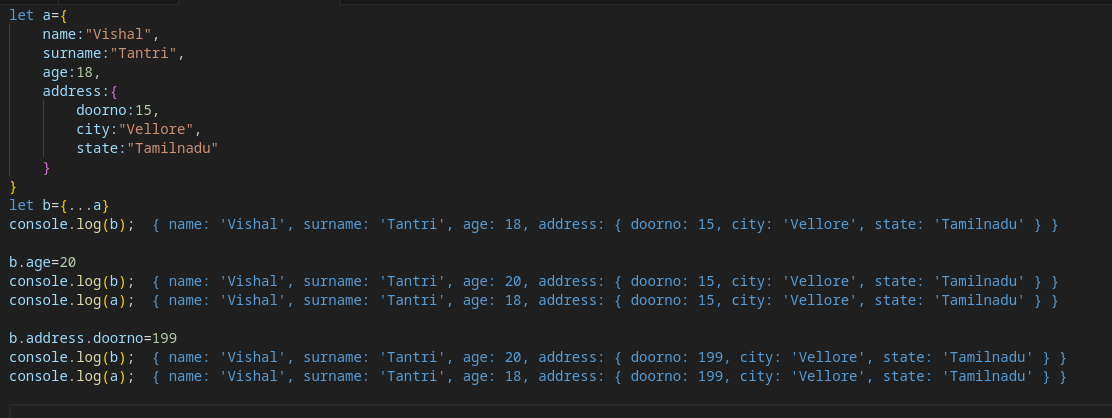
So, how do we make a deep copy?
That is, how do we create a copy of the entire object, including all the nested objects inside it?
Solution 2: Serialization
To achieve this, we use the concept of serialization. Here, the object is first converted into a primitive type. Since primitive types are copied by value, assigning them creates a full copy. Then, this primitive data is converted back into an object. This reverse process is called deserialization. Together, these result in a deep copy of the object.
In simple terms, think of it like this:
If you want to transport a human from one place to another, you cannot transport them in their physical form directly. So you convert the human into another form (say, binary data), transport that data, and then reconstruct the human back to the original form at the destination.
This idea of converting data to another form for transfer or storage and then converting it back is exactly what serialization and deserialization mean.
This is how deep copying using serialization is done in JavaScript.
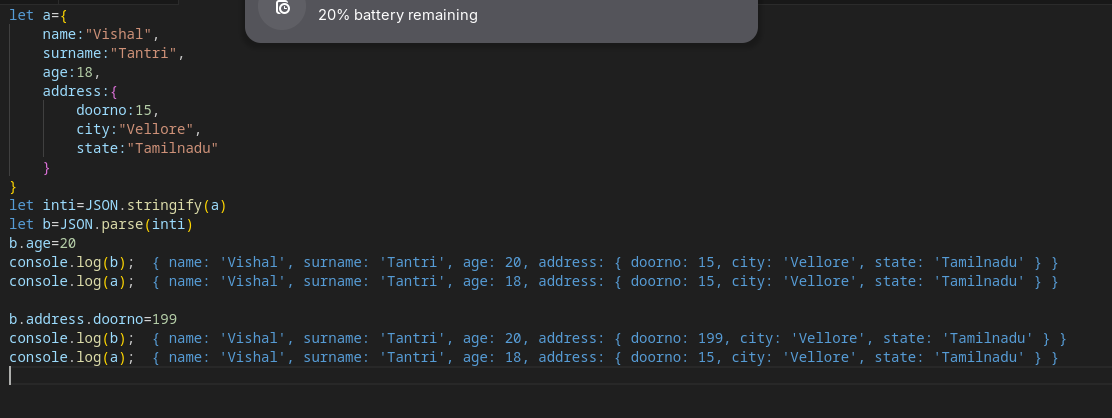
In JavaScript, you can serialize an object to a JSON string by calling the function JSON.stringify(). you can deserialize a JSON string to an object by calling the function JSON.parse().